Showing posts with label sharepoint 2010. Show all posts

Tuesday, April 21, 2015

Impersonating user in Sharepoint Server Object Model

Hi Readers,

I came across a requirement to upload some files using a console application to sharepoint, but there was a workflow which needed to started when an item is added, so using System Account was not an option.

This is a way to impersonate the user and access the web.


//Connect to the site as System Account
using (SPSite site = new SPSite("Site URL"))
{
    using (SPWeb web = site.OpenWeb())
    {
        //Get the spuser object from the site
        SPUser userToImpersonate = web.EnsureUser(@"Domain\username");

        //Connect to the site again using the Token
        using (SPSite impSite = new SPSite("Site URL", userToImpersonate.UserToken))
        {
            using (SPWeb web2 = impSite.OpenWeb())
            {
                //Impersonated Block
            }
        }
    }
}


Happy Coding
Guruparan Giritharan

Wednesday, July 10, 2013

Federating Sharepoint Services between Farms

Hi Readers,

In this post i'll explain how to federate and access a Sharepoint 2013 service application from Sharepoint 2010.

The concept is simple both farms will need to have a trust relationship,
this relationship is established by exchanging certificate between farms.

All the Commands given in this post will have to be run on the machine which the Central Administration is running.

First you'll need to get the certificate from the Consumer Farm, here the 2010 Farm.
Here you'll need to get the Root Certificate and the Security Token Service Certificate.

$rootCert = (Get-SPCertificateAuthority).RootCertificate 
$rootCert.Export("Cert") | Set-Content "C:\ConsumerFarmRoot.cer" -Encoding byte 

$stsCert = (Get-SPSecurityTokenServiceConfig).LocalLoginProvider.SigningCertificate 
$stsCert.Export("Cert") | Set-Content "C:\ConsumerFarmSTS.cer" -Encoding byte


Then we'll need to get the Root Certificate from the Publisher Farm

$rootCert = (Get-SPCertificateAuthority).RootCertificate 
$rootCert.Export("Cert") | Set-Content "C:\PublisherFarmRoot.cer" -Encoding byte

Then we'll have to exchange (Copy) the certificates between the farms.

After exchanging the certificates between the farms we'll have to establish the trust between farms.

Creating trust in Publisher Farm
Create trusted Authority
$trustCert = Get-PfxCertificate "C:\ConsumerFarmRoot.cer" 
New-SPTrustedRootAuthority "ConsumerFarm" -Certificate $trustCert

Create trusted token issuer
$stsCert = Get-PfxCertificate "c:\ConsumerFarmSTS.cer" 
New-SPTrustedServiceTokenIssuer "ConsumerFarm" -Certificate $stsCert

Now you'll have to do some security configuration
First Get the GUID of the Consumer Farm

(Get-SPFarm).Id

Then give access to Publisher farm (Run in Publisher farm)
$security = Get-SPTopologyServiceApplication | Get-SPServiceApplicationSecurity
$claimProvider = (Get-SPClaimProvider System).ClaimProvider
$principal = New-SPClaimsPrincipal -ClaimType "http://schemas.microsoft.com/sharepoint/2009/08/claims/farmid" –ClaimProvider  $claimProvider -ClaimValue  ConsumerFarmID
Grant-SPObjectSecurity -Identity $security -Principal $principal -Rights "Full Control"
Get-SPTopologyServiceApplication | Set-SPServiceApplicationSecurity -ObjectSecurity $security

Now we'll have to get the information from the service application of 2013 and create a service proxy in sharepoint 2010 central admin.

First go to the Shapoint 2013 central Admin and Go to Application Management and the select the Manage Service Applications.
Then select the Service application that you want to federate and click publish on the ribbon

from the menu check the "Publish this Service Application to other farms"
and copy the Service URL.

Then Click permissions from the ribbon and give full control to the Farm Admin of the Consumer farm.

Now we have the service URL so we can create a proxy at the Consumer End and start using the service.

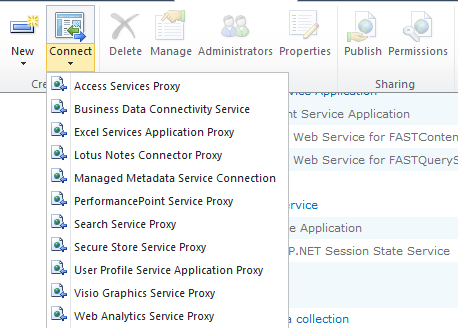
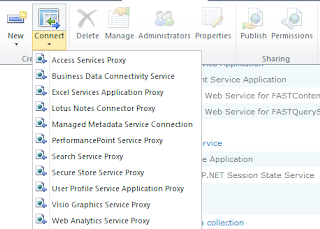
In the Central admin of the consumer farm go to Application Management->Manage Service Applications and the from the ribbon click connect and select the service type which you are going to access.


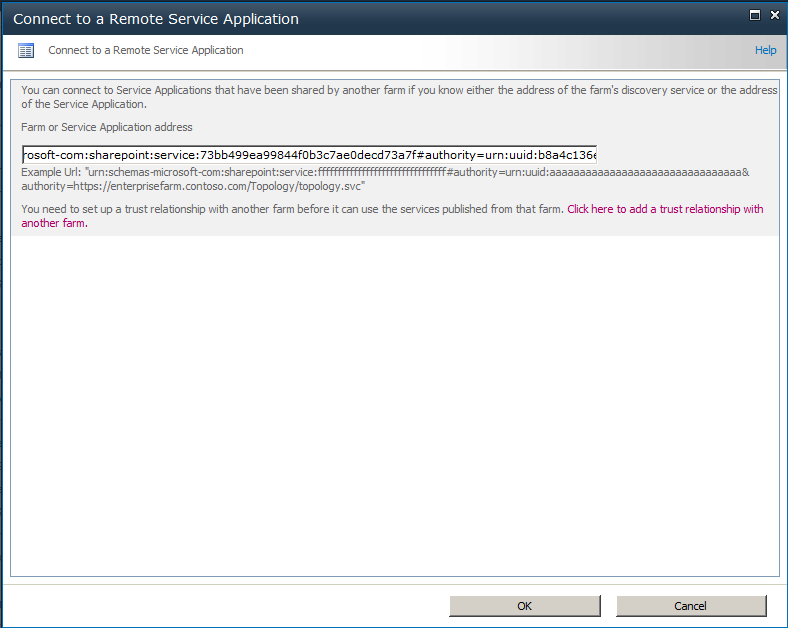
Then give the URL of the service address we copied from Publisher service click ok.


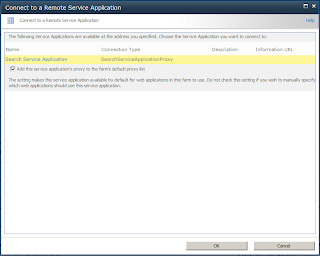
Now sharepoint will show you the available service at the location, select it and click OK, then you'll have to give a name for the proxy, when its done you can use the service of 2013 from 2010 applications.

Please leave a comment :) 

Tuesday, February 5, 2013

Download files from Sharepoint Library Recursively

Hi
This is a small program that will download the contents of a Sharepoint documnt library.

This will download all the files in the subfolders as well

class Program
{
 static void Main(string[] args)
 {
  Console.WriteLine("This Application will download the documents in a library");
  Console.Write("Enter Site URL : ");
  string SiteURL = Console.ReadLine();

  Console.Write("Library Name : ");
  string LibraryName = Console.ReadLine();

  //Open the site using the given url
  using (SPSite site = new SPSite(SiteURL))
  {
   //Open the web application
   using (SPWeb web = site.OpenWeb())
   {
    try
    {
     //Get the library folder
     SPFolder folder = web.GetFolder(LibraryName);

     //Download files
     downloadFilesrecursively(folder);
    }
    catch (Exception ex)
    {
     //Print the details of the exception
     Console.WriteLine("An Error Occured while processing " + ex.Message);
    }
   }
  }

  Console.ReadLine();
 }

 //The method that downloads the files from a given SPFolder
 public static void downloadFiles(SPFolder folder)
 {
  foreach (SPFile item in folder.Files)
  {
   //Download the file
   byte[] fileData = item.OpenBinary();
   System.IO.FileStream fstream = System.IO.File.Create(item.Name);
   fstream.Write(fileData, 0, fileData.Length);
   Console.WriteLine(item.Name + " " + fileData.Length);
  }
 }

 //Method that is used to call the download method recursively
 public static void downloadFilesrecursively(SPFolder folder)
 {
  //If the folder have subfolders call the download
  //Methods for the subfolders
  if (folder.SubFolders.Count != 0)
  {
   //Download the files in the current folder
   downloadFiles(folder);
   foreach (SPFolder item in folder.SubFolders)
   {
    downloadFilesrecursively(item);
   }
  }
  else
  {
   //If the folder has no subfolders
   //then download the file in the folder
     downloadFiles(folder);   
  }
 }
}

Tuesday, January 8, 2013

Creating Sharepoint Security Groups and Adding People to it via Code

Hi Readers

In this post I'll explain how to Create security groups using C# code and add users to the group.

//Get the specific site
using (SPSite site = new SPSite("http://mytestsite"))
{
    using (SPWeb web = site.OpenWeb())
    {
        //Create the user group with the name test group
        //The default user and the description will have to be given
        web.SiteGroups.Add("Test Group", web.Users["abc\\user"], null, "This is a test group");
        //Add a user to the group
        //The other parameters are given emplty strings because they are not required
        web.SiteGroups["Test Group"].AddUser("abc\\user2", "", "", "");
    }
}

This is really simple.

Leave a comment if you have any queries

-Guruparan-

Thursday, December 27, 2012

Create Folders in a Sharepoint Library through Code

Hi
 
In this post I'll explain how to create folders in a sharepoint library using C# Code.

This will be useful when you have to create custom folder structures in a sharepoint library.

First you'll need a shapoint Document Library which you are going to add folders to.

Here I'm using the library named 'My Documents' and creating a folder named 'New Folder'

using(SPSite mySite=new SPSite("http://mysite"))
{
 using(SPWeb myWeb=mySite.OpenWeb())
 {
  //Get the Folder Library
  SPList MyFiles = myWeb.Lists["My Documents"];

  //Create the URL for the Folder Library
  //You can have a string variable for url on top and use it here as well
  string folderURL = myWeb.Url + "/" + MyFiles.Title;

  //Set the name for the folder
  string folderName="New Folder";

  //Create the folder inside the library
  SPListItem OpportunityFolder = MyFiles.Items.Add(url, SPFileSystemObjectType.Folder, folderName);
  OpportunityFolder.Update();
 }
}
 
Now we'll see how to delete the folder we created.

using(SPSite mySite=new SPSite("http://mysite"))
{
 using(SPWeb myWeb=mySite.OpenWeb())
 {
  //Get the document folder library
  SPList MyFiles = myWeb.Lists["My Documents"];
  //Get the folder url
  string url = myWeb.Url + "/" + MyFiles.Title;
  //Get the folder name
  string folderName = "New Folder";
  //Delete the created folder
  properties.Web.Folders["My Documents"].SubFolders.Delete(folderName);
 }
}
 
Hope this is useful
Please leave a comment

Friday, August 24, 2012

Sharepoint : Get User's Permission for Lists

Hi this is a small program that print the permission for a given user in a sharepoint site
this helps the admins to know whether a user has access to a particular list and what access.

This simply helps to know what a user can do in each list.
using System;
using System.Collections.Generic;
using System.Linq;
using System.Text;
using Microsoft.SharePoint;

namespace PermissionViewer
{
    class Program
    {
        static void Main(string[] args)
        {
            //Get the site url
            Console.Write("Enter Site Url  : ");
            string siteURL = Console.ReadLine();

            //Get the user name of user
            Console.Write("Enter User Name : ");
            string UserName = Console.ReadLine();

            try
            {
                //Get the sharepoint site
                using (SPSite sharepointSite = new SPSite(siteURL))
                {
                    //open the site
                    using (SPWeb sharepointweb = sharepointSite.OpenWeb())
                    {
                        //Get each and every list in sharepoint site
                        foreach (SPList sharepointList in sharepointweb.Lists)
                        {
                            //Get roles assigned for each list
                            foreach (SPRoleAssignment assignedRoles in sharepointList.RoleAssignments)
                            {
                                //Check whether the role if for a user
                                if (assignedRoles.Member is SPUser)
                                {
                                    //get the user from the role
                                    SPUser user = (SPUser)assignedRoles.Member;
                                    //Check whether its the same user that is entered
                                    if (user.Name.Equals(UserName, StringComparison.OrdinalIgnoreCase))
                                    {
                                        //removes user
                                        //item.RoleAssignments.Remove(item1);

                                        //Get users permissions - Add Remove Etc
                                        foreach (SPRoleDefinition item in assignedRoles.RoleDefinitionBindings)
                                        {
                                            Console.WriteLine("List : " + sharepointList.Title + "\nAccess : " + item.Name + "\n");
                                        }
                                    }
                                }

                                //Check whether the role is for a security group
                                if (assignedRoles.Member is SPGroup)
                                {
                                    //Get the security group
                                    SPGroup grp = (SPGroup)assignedRoles.Member;

                                    //Iterate members of the group
                                    foreach (SPUser groupMember in grp.Users)
                                    {
                                        //Check whether the user is the entered user
                                        if (groupMember.Name.Equals(UserName, StringComparison.OrdinalIgnoreCase))
                                        {
                                            //Get users permissions - Add Remove Etc
                                            foreach (SPRoleDefinition item in assignedRoles.RoleDefinitionBindings)
                                            {
                                                Console.WriteLine("List : " + sharepointList.Title + "\nGroup : " + grp.Name + "\nAccess : " + item.Name + "\n");
                                            }
                                            //uncomment if you want to remove a person from group
                                            //grp.RemoveUser(user1);
                                        }
                                    }
                                }
                            }
                        }
                    }
                }

            }
            catch (Exception Ex)
            {
                //Print if any exceptions occur
                Console.WriteLine("Error : "+Ex.Message);
            }
            //used make sure that the prompt is not closed
            Console.WriteLine("insert some value to exit");
            Console.ReadLine();
        }
    }
}