Hello Readers,
We had to setup a new content source in our search and suddenly we got this error while going to the Content sources in Search Service Application.
I googled n didn't find much information so i went through the ULS logs and found these entries.
An operation failed because the following certificate has validation errors: Subject Name: CN=###############.com Issuer Name: CN=###############.com Thumbprint: 9238C86F4CF817870AFAB778E9E5E140D7ADE82F Errors: The root of the certificate chain is not a trusted root authority..
STS Call: Failed to issue new security token. Exception: System.IdentityModel.Tokens.SecurityTokenValidationException: ID4257: X.509 certificate
'CN=###############.com' validation failed by the token handler.
An exception occurred when trying to issue security token: ID3242: The security token could not be authenticated or authorized..
the actual issue was that one of the certificates were not added to 'SPTrustedRootAuthority'
Fixing this is simple
$cert = Get-PfxCertificate C:\###############.pfx
New-SPTrustedRootAuthority -Name "###############" -Certificate $cert
If you have a certificate that requires a password
Use IE and go to 'Central Admin'/_admin/ManageTrust.aspx and upload the certifcate.
That's how i got the issue fixed.
Hope it helps :)
Happy Coding
Guruparan Giritharan
Showing posts with label certificate. Show all posts
Showing posts with label certificate. Show all posts
Monday, May 30, 2016

Wednesday, July 10, 2013
Federating Sharepoint Services between Farms
Hi Readers,
In this post i'll explain how to federate and access a Sharepoint 2013 service application from Sharepoint 2010.
The concept is simple both farms will need to have a trust relationship,
this relationship is established by exchanging certificate between farms.
All the Commands given in this post will have to be run on the machine which the Central Administration is running.
First you'll need to get the certificate from the Consumer Farm, here the 2010 Farm.
Here you'll need to get the Root Certificate and the Security Token Service Certificate.
Then we'll need to get the Root Certificate from the Publisher Farm
Then we'll have to exchange (Copy) the certificates between the farms.
After exchanging the certificates between the farms we'll have to establish the trust between farms.
Creating trust in Publisher Farm
Now you'll have to do some security configuration
First Get the GUID of the Consumer Farm
Then give access to Publisher farm (Run in Publisher farm)
Now we'll have to get the information from the service application of 2013 and create a service proxy in sharepoint 2010 central admin.
First go to the Shapoint 2013 central Admin and Go to Application Management and the select the Manage Service Applications.
Then select the Service application that you want to federate and click publish on the ribbon

from the menu check the "Publish this Service Application to other farms"
and copy the Service URL.
Then Click permissions from the ribbon and give full control to the Farm Admin of the Consumer farm.
Now we have the service URL so we can create a proxy at the Consumer End and start using the service.
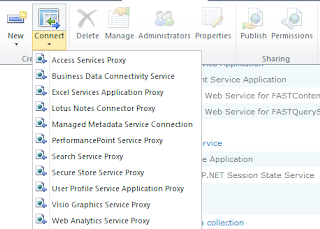
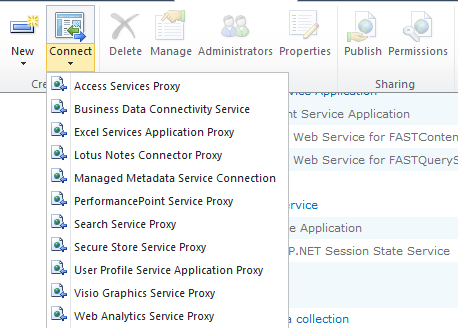
In the Central admin of the consumer farm go to Application Management->Manage Service Applications and the from the ribbon click connect and select the service type which you are going to access.

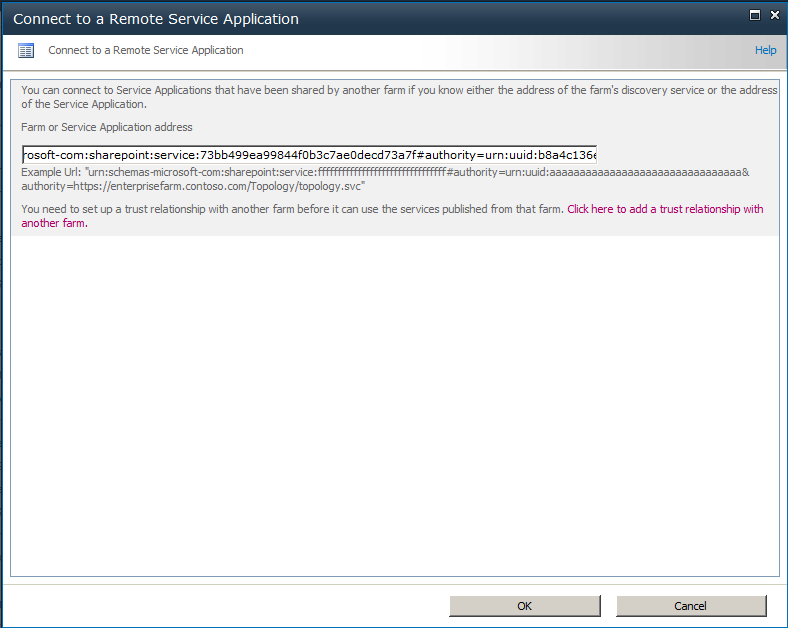
Then give the URL of the service address we copied from Publisher service click ok.

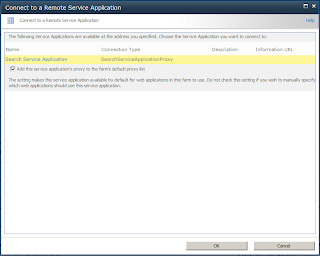
Now sharepoint will show you the available service at the location, select it and click OK, then you'll have to give a name for the proxy, when its done you can use the service of 2013 from 2010 applications.
Please leave a comment :)
In this post i'll explain how to federate and access a Sharepoint 2013 service application from Sharepoint 2010.
The concept is simple both farms will need to have a trust relationship,
this relationship is established by exchanging certificate between farms.
All the Commands given in this post will have to be run on the machine which the Central Administration is running.
First you'll need to get the certificate from the Consumer Farm, here the 2010 Farm.
Here you'll need to get the Root Certificate and the Security Token Service Certificate.
$rootCert = (Get-SPCertificateAuthority).RootCertificate
$rootCert.Export("Cert") | Set-Content "C:\ConsumerFarmRoot.cer" -Encoding byte

$stsCert = (Get-SPSecurityTokenServiceConfig).LocalLoginProvider.SigningCertificate
$stsCert.Export("Cert") | Set-Content "C:\ConsumerFarmSTS.cer" -Encoding byte
Then we'll need to get the Root Certificate from the Publisher Farm
$rootCert = (Get-SPCertificateAuthority).RootCertificate
$rootCert.Export("Cert") | Set-Content "C:\PublisherFarmRoot.cer" -Encoding byte
Then we'll have to exchange (Copy) the certificates between the farms.
After exchanging the certificates between the farms we'll have to establish the trust between farms.
Creating trust in Publisher Farm
Create trusted Authority
$trustCert = Get-PfxCertificate "C:\ConsumerFarmRoot.cer"
New-SPTrustedRootAuthority "ConsumerFarm" -Certificate $trustCert

Create trusted token issuer
$stsCert = Get-PfxCertificate "c:\ConsumerFarmSTS.cer"
New-SPTrustedServiceTokenIssuer "ConsumerFarm" -Certificate $stsCert
Now you'll have to do some security configuration
First Get the GUID of the Consumer Farm
(Get-SPFarm).Id
Then give access to Publisher farm (Run in Publisher farm)
$security = Get-SPTopologyServiceApplication | Get-SPServiceApplicationSecurity
$claimProvider = (Get-SPClaimProvider System).ClaimProvider
$principal = New-SPClaimsPrincipal -ClaimType "http://schemas.microsoft.com/sharepoint/2009/08/claims/farmid" –ClaimProvider  $claimProvider -ClaimValue  ConsumerFarmID
Grant-SPObjectSecurity -Identity $security -Principal $principal -Rights "Full Control"
Get-SPTopologyServiceApplication | Set-SPServiceApplicationSecurity -ObjectSecurity $security
Now we'll have to get the information from the service application of 2013 and create a service proxy in sharepoint 2010 central admin.
First go to the Shapoint 2013 central Admin and Go to Application Management and the select the Manage Service Applications.
Then select the Service application that you want to federate and click publish on the ribbon

from the menu check the "Publish this Service Application to other farms"
and copy the Service URL.
Then Click permissions from the ribbon and give full control to the Farm Admin of the Consumer farm.
Now we have the service URL so we can create a proxy at the Consumer End and start using the service.
In the Central admin of the consumer farm go to Application Management->Manage Service Applications and the from the ribbon click connect and select the service type which you are going to access.

Then give the URL of the service address we copied from Publisher service click ok.

Now sharepoint will show you the available service at the location, select it and click OK, then you'll have to give a name for the proxy, when its done you can use the service of 2013 from 2010 applications.
Please leave a comment :)
Subscribe to:
Posts (Atom)