Showing posts with label c#. Show all posts

Sunday, February 12, 2017

Beginner's Guide to Angular 2 + WebApi

Hello Everyone,

This post is an initial guide for anyone who wants to use Angular 2 to access a .Net WebApi back end to access SQL server database.
This will guide you to do the basic CRUD operations using the WebApi REST service.

Now lets see our requirement.
We have Brands and Models for cars which is having a one to many relationship where one brand will have more than one model. We will be doing the CRUD operations on the models and brands will be inserted directly to database. The image below shows the EF model of our database.

There are two WebApi controllers built using the above entities one for brands and one for models.

Now lets move on to the Angular 2 front end, the image below shows the file structure in VS code.
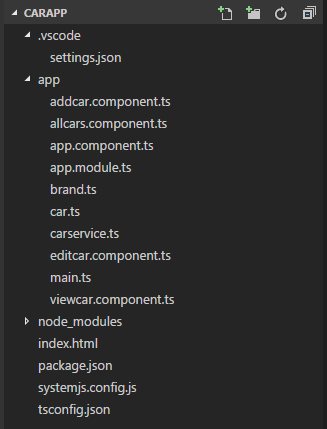
As you can see we have five component classes each will be representing an user interface except the app.component.ts which will be used as the frame for navigation and other component content will be loaded into this component as this is single page application.

We have a carservice.ts which will be interacting with the WebApi.
There are two classes Car and Brand representing our entities in the backend these will be used to when we send and receive data to the service.

The other files are the default set of files in Angular 2 project, here is brief description of each file.
tsconfig.json Specifies the root files and the compiler options required to compile the project
systemjsconfig.js Allows to configure SystemJS to load modules compiled using the TypeScript compiler.
package.json Used by NPM installer to install the packages
app.module.ts Defines AppModule, the root module that tells Angular how to assemble the application.

Now lets move on to our user interface of listing the cars.
You can see the code for this component class in the below URL.
https://github.com/guruparan/BlogSample/blob/master/AngularSample1/CarApp/app/allcars.component.ts
If you can see the code here we request all the cars from the carservice class and display it.
Delete option is also added to the same view where a method is called when the delete button is clicked.

The next screen will be the add new car screen
Here we have a drop down of brands which will be loaded when the page loads and we will be redirecting to all cars page when the new car is saved.
You can see the code for this component in the below URL.
https://github.com/guruparan/BlogSample/blob/master/AngularSample1/CarApp/app/addcar.component.ts

The next screen will be edit item,
As you can see the url of the browser it bring in the parameter Id of the car which will be used by to retrieve the car of that id and load the values, other than that this screen is same as the add car screen.
You can see the code for this component in the below URL.
https://github.com/guruparan/BlogSample/blob/master/AngularSample1/CarApp/app/editcar.component.ts

The next screen will be view item.
Again this screen is simple and does not have any actions, it receives the data from the service just like the edit screen using the parameter that is passed via the URL.
You can see the code for this component in the below URL.
https://github.com/guruparan/BlogSample/blob/master/AngularSample1/CarApp/app/viewcar.component.ts

 The most important class of all is the service class and it handles all the requests to the service.
You can see the code for the service class in the below URL.
https://github.com/guruparan/BlogSample/blob/master/AngularSample1/CarApp/app/carservice.ts

Developer Note:
1. This is not 'THE' way to do this but this is also an approach to get started.
2. The templates can be moved to separate html files but kept in the component
3. Bootstrap is used for styling , style can be added separately per component .
4. You can use any other service technology to try this out.

The whole code including the WebApi service can be obtained in the below repository.
https://github.com/guruparan/BlogSample/tree/master/AngularSample1

Happy Coding
-Guru-


Thursday, May 30, 2013

Using a WSDL file in C#

Hi Readers

This Article is about using the WSDL file from a non .NET based service with C#.
Say that you got a WSDL file from Java based service and you want to access it using C# , You may think its hard but its really easy.
All you have to do is to use the WSDL utility.

Lets go Step By Step

Step 1 : Save your WSDL with the Extension .wsdl because .XML wont work
I'm using this file as the sample.

Step 2: Open the Visual Studio Command Prompt


Step3: Locate the WSDL file (Hello.wsdl) and Use the command WSDL Hello.wsdl

Now you have the CS file Hello_Service.cs

Step 4 : Insert the Hello_Service.cs in your project and
Create an object from the class and simply call the methods.
Happy Coding :)
-Guruparan-

Monday, February 4, 2013

SQLite Database in Windows 8 RT application Part-1

Hi Devs
This post is all about using a SQLIte database in Windows 8 application
In this post i'll explain how to setup Visual Studio 2012 in order to work with SQLite.
In Part 2 I'll explain how to do the basic operations such as Add delete and update.
Lets get started
First you'll have to install the SQLite runtime for windows.
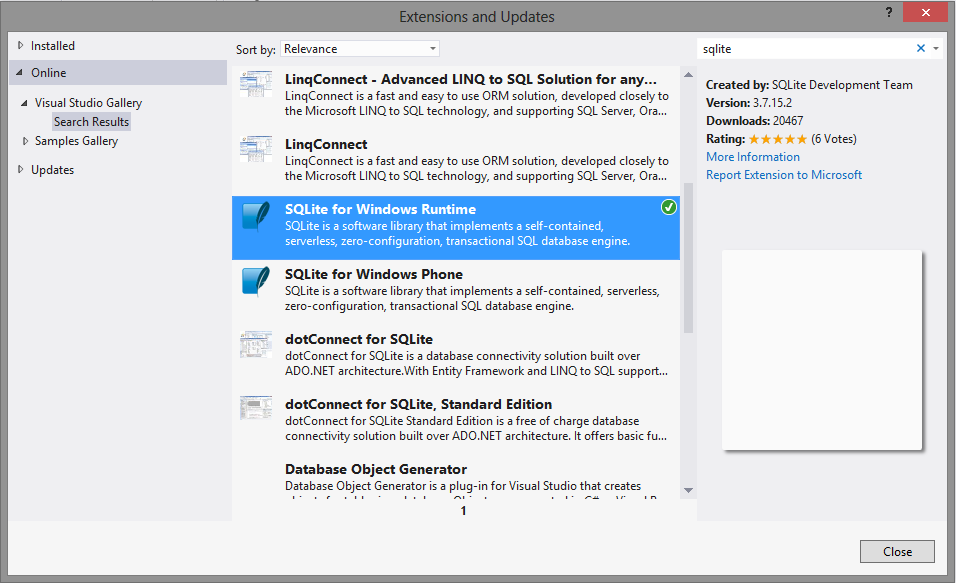
Goto Tools->Extension and Updates

Then search for SQLite and install it

Create a project based on your requirement (Blank\Grid Application)
And now add the reference to your project


Here you'll have to add the reference to both C++ runtime and SQLite runtime because SQLite runtime requires C++ runtime.


Now we can move to the NuGet Packages
Here we'll be installing the Wrapper Class Library for SQlite.

Goto Tools->Library Package Manager->Manage NuGet Packages for Solution


And select the "Online" packages and search for Sqlite-net and install it


Now we are good to start coding
All the coding part will be covered in Part 2.

Please Leave a comment
Guruparan G

Friday, September 28, 2012

Mixing Client Side with Server side ASP.Net

Hi readers

Have you ever had the need to call a server side method from client side or a client side method from server side?

Well i've had this need so many times, so i've searched so many sites and read so many blogs about this. So i also wanted to write a post about this.

 First we'll see how to call a client side method from server side. Its pretty simple. you just have to register the method to the client side.

ClientScript.RegisterStartupScript(typeof(Page), "click", "alert('Hi');",true); ClientScript.RegisterStartupScript(typeof(Page), "click", "initialize()",true);

The first one will show an alert with text Hi and the second one will call the method initialize which is declared in the page.

Well lets see the calling of server side methods from client For this we'll need a script manager and the script manager's 'EnablePageMethods' attribute must be 'true'. And in the codebehind file you'll need to have a public static method

[System.Web.Services.WebMethod]
public static string sayHello(string name)
{
    return "Hello "+name;
}

And this method can be called from javascript
 
function sayHello(name) {
	PageMethods.sayHello(id, sayHellotSuccess, sayHellotFailure);
}
function sayHelloSuccess(result, userContext, methodName) {
	alert(result);
}
function sayHellotFailure(error, userContext, methodName) {
	alert(error.get_message());
}      

Now calling the method sayHello(name) will alert the output from server. And if you throw an exception in the server the 'sayHellotFailure' method will be executed.

 Leave a Comment if you like this post

Friday, August 24, 2012

Sharepoint : Get User's Permission for Lists

Hi this is a small program that print the permission for a given user in a sharepoint site
this helps the admins to know whether a user has access to a particular list and what access.

This simply helps to know what a user can do in each list.
using System;
using System.Collections.Generic;
using System.Linq;
using System.Text;
using Microsoft.SharePoint;

namespace PermissionViewer
{
    class Program
    {
        static void Main(string[] args)
        {
            //Get the site url
            Console.Write("Enter Site Url  : ");
            string siteURL = Console.ReadLine();

            //Get the user name of user
            Console.Write("Enter User Name : ");
            string UserName = Console.ReadLine();

            try
            {
                //Get the sharepoint site
                using (SPSite sharepointSite = new SPSite(siteURL))
                {
                    //open the site
                    using (SPWeb sharepointweb = sharepointSite.OpenWeb())
                    {
                        //Get each and every list in sharepoint site
                        foreach (SPList sharepointList in sharepointweb.Lists)
                        {
                            //Get roles assigned for each list
                            foreach (SPRoleAssignment assignedRoles in sharepointList.RoleAssignments)
                            {
                                //Check whether the role if for a user
                                if (assignedRoles.Member is SPUser)
                                {
                                    //get the user from the role
                                    SPUser user = (SPUser)assignedRoles.Member;
                                    //Check whether its the same user that is entered
                                    if (user.Name.Equals(UserName, StringComparison.OrdinalIgnoreCase))
                                    {
                                        //removes user
                                        //item.RoleAssignments.Remove(item1);

                                        //Get users permissions - Add Remove Etc
                                        foreach (SPRoleDefinition item in assignedRoles.RoleDefinitionBindings)
                                        {
                                            Console.WriteLine("List : " + sharepointList.Title + "\nAccess : " + item.Name + "\n");
                                        }
                                    }
                                }

                                //Check whether the role is for a security group
                                if (assignedRoles.Member is SPGroup)
                                {
                                    //Get the security group
                                    SPGroup grp = (SPGroup)assignedRoles.Member;

                                    //Iterate members of the group
                                    foreach (SPUser groupMember in grp.Users)
                                    {
                                        //Check whether the user is the entered user
                                        if (groupMember.Name.Equals(UserName, StringComparison.OrdinalIgnoreCase))
                                        {
                                            //Get users permissions - Add Remove Etc
                                            foreach (SPRoleDefinition item in assignedRoles.RoleDefinitionBindings)
                                            {
                                                Console.WriteLine("List : " + sharepointList.Title + "\nGroup : " + grp.Name + "\nAccess : " + item.Name + "\n");
                                            }
                                            //uncomment if you want to remove a person from group
                                            //grp.RemoveUser(user1);
                                        }
                                    }
                                }
                            }
                        }
                    }
                }

            }
            catch (Exception Ex)
            {
                //Print if any exceptions occur
                Console.WriteLine("Error : "+Ex.Message);
            }
            //used make sure that the prompt is not closed
            Console.WriteLine("insert some value to exit");
            Console.ReadLine();
        }
    }
}

Monday, July 16, 2012

Linq to XML

Hi readers

This post is about using Linq to XML to create a small Employee Management System.
This post will explain how to add delete update and query an XML document which contains information of employees.
The post will contain the basic coding needed and you can download the complete sample HERE First we'll see the structure of the XML we are going to use.

<?xml version="1.0" encoding="utf-8"?>
<Employees>
  <Employee ID="1">
    <Name>Saman</Name>
    <Department>Delivery</Department>
  </Employee>
  <Employee ID="2">
    <Name>Nimal</Name>
    <Department>Delivery</Department>
  </Employee>
</Employees>
 
For this I'm using a class called Employee. You can do this with or without a class but using a class is a standard and easy way. This class is used to transfer data between the UI and the EmployeeManager class. The interaction between the XML file and the program are done using Linq.

This the class diagram for the Employee and the Employee Manager Class

Well lets got to the coding part The Employee class is very simple just three attributes

public class Employee
{
//attribute ID
public int ID { get; set; }

//Element Name
public string Name { get; set; }

//Element Department
public string Department { get; set; }
}

Now the Employee Manager Class

public class EmployeeManager
{
    /// <summary>
    /// The path of the XML file 
    /// </summary>
    private string XMLFile;

    /// <summary>
    /// Employee Manager is used to handle the interaction between the XML file
    /// and the application
    /// </summary>
    /// <param name="file">The Location of the XML File</param>
    public EmployeeManager(string file)
    {
        XMLFile = file;

        //create the XML file if it doest exist
        if (!File.Exists(XMLFile))
        {
            //As the file is not there a new XML Document is created
            //Blank space is used to create an empty tag
            XDocument document = new  XDocument(
                                        new XElement("Employees","")
                                      );
            document.Save(XMLFile);
        }
    }

    /// <summary>
    /// Add an Employee to the XML file
    /// </summary>
    /// <param name="newEmployee">The Employee to be added</param>
    /// <returns>True if Success false otherwise</returns>
    public bool addEmployee(Employee newEmployee)
    {
        try
        {
            //load the xml file 
            XDocument document = XDocument.Load(XMLFile);
            //Get create a new Employee Element
            XElement employee = new XElement("Employee");
            //Set the value for the attribute
            employee.SetAttributeValue("ID",newEmployee.ID);
            //set the value for the child elements
            employee.Add(new XElement("Name", newEmployee.Name));
            employee.Add(new XElement("Department", newEmployee.Department));
            //add the created Employee element to the root element Employee
            document.Element("Employees").Add(employee);
            //Save the XML file so that the new Employee will be added
            document.Save(XMLFile);
            //Return to if success
            return true;
        }
        catch (Exception)
        {
            //return false if any exception occur
            return false;
        }

    }

    /// <summary>
    /// Delete an Employee from the XML file
    /// </summary>
    /// <param name="EmployeeID">ID of the Employee to be Deleted</param>
    /// <returns>True if Success false otherwise</returns>
    public bool deleteEmployee(int EmployeeID)
    {
        try
        {
            //Load the XML document
            XDocument document = XDocument.Load(XMLFile);
            //Get the Root tag Employees and get the Employee element to be deleted
            document.Element("Employees").Elements("Employee").FirstOrDefault
                (
                    //in here we are getting the first or default so if no element
                    //is there we'll get an exception
                    //We are comparing the attribute here
                    X => X.Attribute("ID").Value.Trim() == EmployeeID.ToString()
                    //the remove method deletes the employee
                ).Remove();
            //saving the changes to the XML file
            document.Save(XMLFile);
            return true;
        }
        catch (Exception)
        {
            return false;
        }
    }

    /// <summary>
    /// Update the attributes of an Employee
    /// </summary>
    /// <param name="updatedEmployee">Employee Object with Updated Values</param>
    /// <returns>True if Success false otherwise</returns>
    public bool updateEmployee(Employee updatedEmployee)
    {
        try
        {
            //Load the file
            XDocument document = XDocument.Load(XMLFile);
            //Update the child element values for the selected employee
            //you can use setAttribute method if you want to set an attributes value 
            document.Element("Employees").Elements("Employee").FirstOrDefault
                (
                    X => X.Attribute("ID").Value.Trim() == updatedEmployee.ID.ToString()
                ).SetElementValue("Name", updatedEmployee.Name);

            document.Element("Employees").Elements("Employee").FirstOrDefault
                (
                    X => X.Attribute("ID").Value.Trim() == updatedEmployee.ID.ToString()
                ).SetElementValue("Department", updatedEmployee.Department);
            //save changes to the xml file
            document.Save(XMLFile);
            return true;
        }
        catch (Exception)
        {
            return false;
        }
    }

    /// <summary>
    /// Get a list of All The employees in the 
    /// </summary>
    /// <returns>List of all Employees</returns>
    public List<Employee> getAllEmployees()
    {
        //Create an empty List to store the employee object
        List<Employee> empList = new List<Employee>();

        XDocument document = XDocument.Load(XMLFile);
        //here we are reading all the Employee values and create objects
        //and add it to the list
        foreach (XElement employee in document.Element("Employees").Elements("Employee"))
        {
            Employee emp = new Employee();
            emp.ID = Convert.ToInt32(employee.Attribute("ID").Value.Trim());
            emp.Name = employee.Element("Name").Value.Trim();
            emp.Department = employee.Element("Department").Value.Trim();
            empList.Add(emp);
        }
        //return the list
        return empList;
    }

    /// <summary>
    /// Get a selectes employee from the XML file
    /// </summary>
    /// <param name="ID">ID of the Employee</param>
    /// <returns>Employee object for the given ID</returns>
    public Employee getEmployee(int ID)
    {
        try
        {
            XDocument document = XDocument.Load(XMLFile);
            //Here we are selecting a single employee element and retrive its element values and
            //create a Employee object from it
            XElement employee = document.Element("Employees").Elements("Employee").FirstOrDefault(
                X => X.Attribute("ID").Value.Trim() == ID.ToString()
                );

            Employee selectedEmployee = new Employee() { 
                ID = Convert.ToInt32(employee.Attribute("ID").Value.Trim()),
                Name=employee.Element("Name").Value.Trim(),
                Department=employee.Element("Department").Value.Trim() 
            };
            //return the employe object
            return selectedEmployee;
        }
        catch (Exception)
        {
            //return null if no employee found with given ID
            return null;
        }

    }
}
This is the coding part.
Now you can create a UI like this and access the Employee Manager class and get things done.

Sample UI
 

You can download the complete sample HERE
Please leave a comment if you like the post 
Happy Coding :)
Guruparan Giritharan.

Thursday, March 29, 2012

C# age function

Hi readers this is a function developed to get the age on a given date.
feel free to use it.
Inputs are Date of Birth and the date to compare
if you want to get the Age as of Today set the second argument as DateTime.Today.

public static int calculateAge(DateTime DateOfBirth,DateTime DateAsOF)
{
   int years = DateAsOF.Year - DateOfBirth.Year-1;
            
   if (DateAsOF.Month > DateOfBirth.Month)
   {
      years++;
   }
   else if (DateAsOF.Month == DateOfBirth.Month)
   {
      if (DateAsOF.Day>=DateOfBirth.Day)
      {
          years++;
      }

   }
   return years;
}